
CMD Sports FU88 is one of the sports lobbies available through the FU88 sports section. Its interface combines match filters, full-time and first-half markets, a Live Center and ticket-tracking tools within the same dashboard.
The reviewed lobby displays conventional sports such as football, basketball and tennis alongside an esports section containing competitive games including King of Glory, Dota 2 and League of Legends.
Other sports lobbies and related market guides can be found through the FU88 Sports Betting section.
Overview of the CMD Sports FU88 Interface
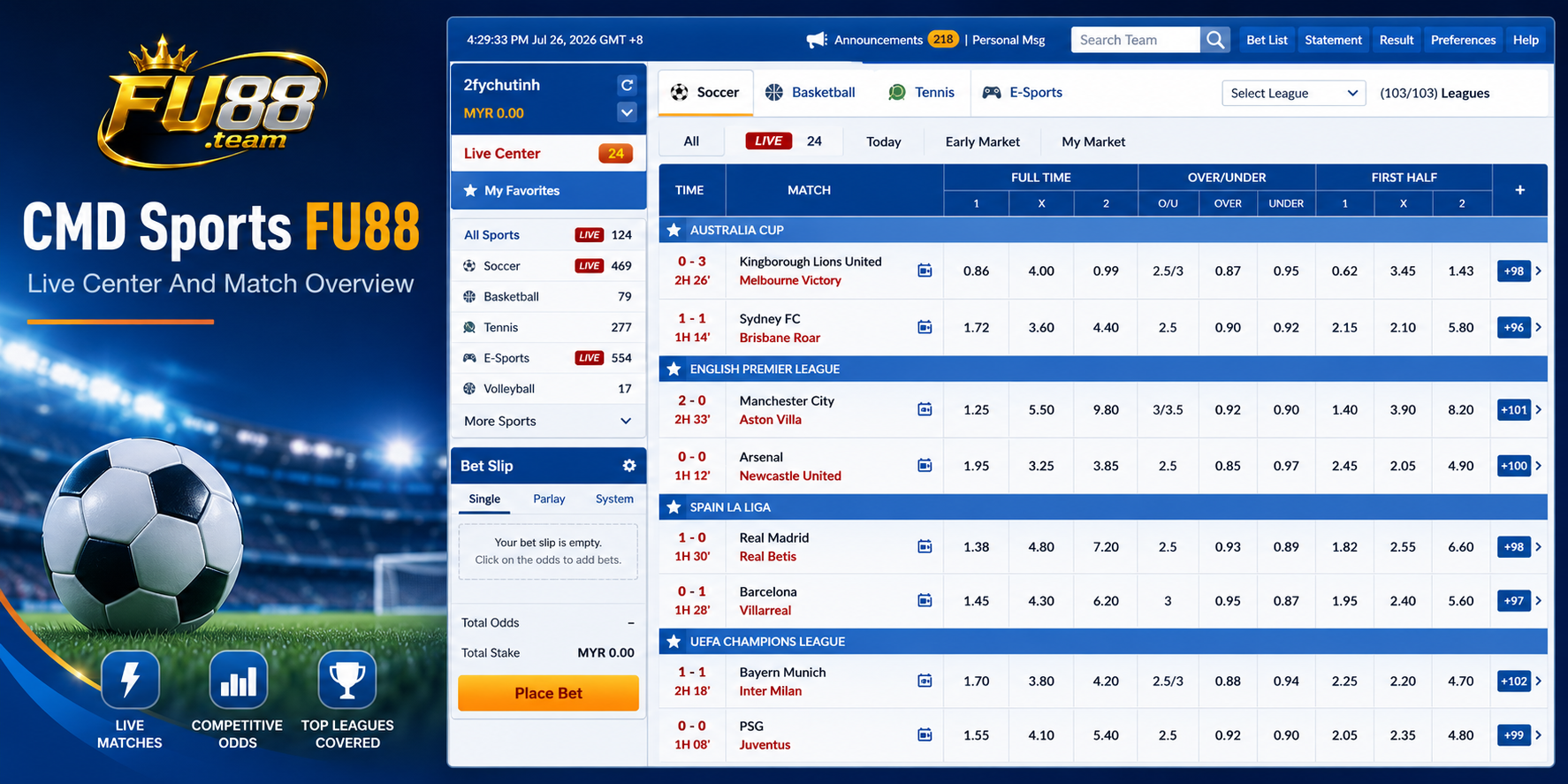
The CMD Sports interface is arranged around a central match table. Filters and sports categories help narrow the event list, while ticket information is displayed through separate panels.
The reviewed screen includes:
- Today
- Parlay
- Live Center
- Mini Bet List
- Pending Bets
- Last Bets
These controls separate event discovery from ticket tracking. Today focuses on the current schedule, while Parlay filters the market list to selections that may be combined.
The interface also provides filters for date, time, sport, competition and league. Applying these controls before reading the market table can reduce the chance of selecting the wrong fixture.
Finding Events by Sport and Competition
CMD Sports groups events by sport and league. The supplied interface confirms access to:
- Soccer
- Basketball
- Tennis
- Cricket
- Baseball
- Rugby
- Esports
Individual events can be narrowed using the date and league filters. This is useful when several competitions are shown simultaneously or when the same teams appear in different tournaments.
Before reading a market, confirm:
- The selected sport
- The competition or league
- The event date
- The two teams
- The match status
For live events, the current score and match period should be reviewed before any price is selected.
How the CMD Sports Match Table Works
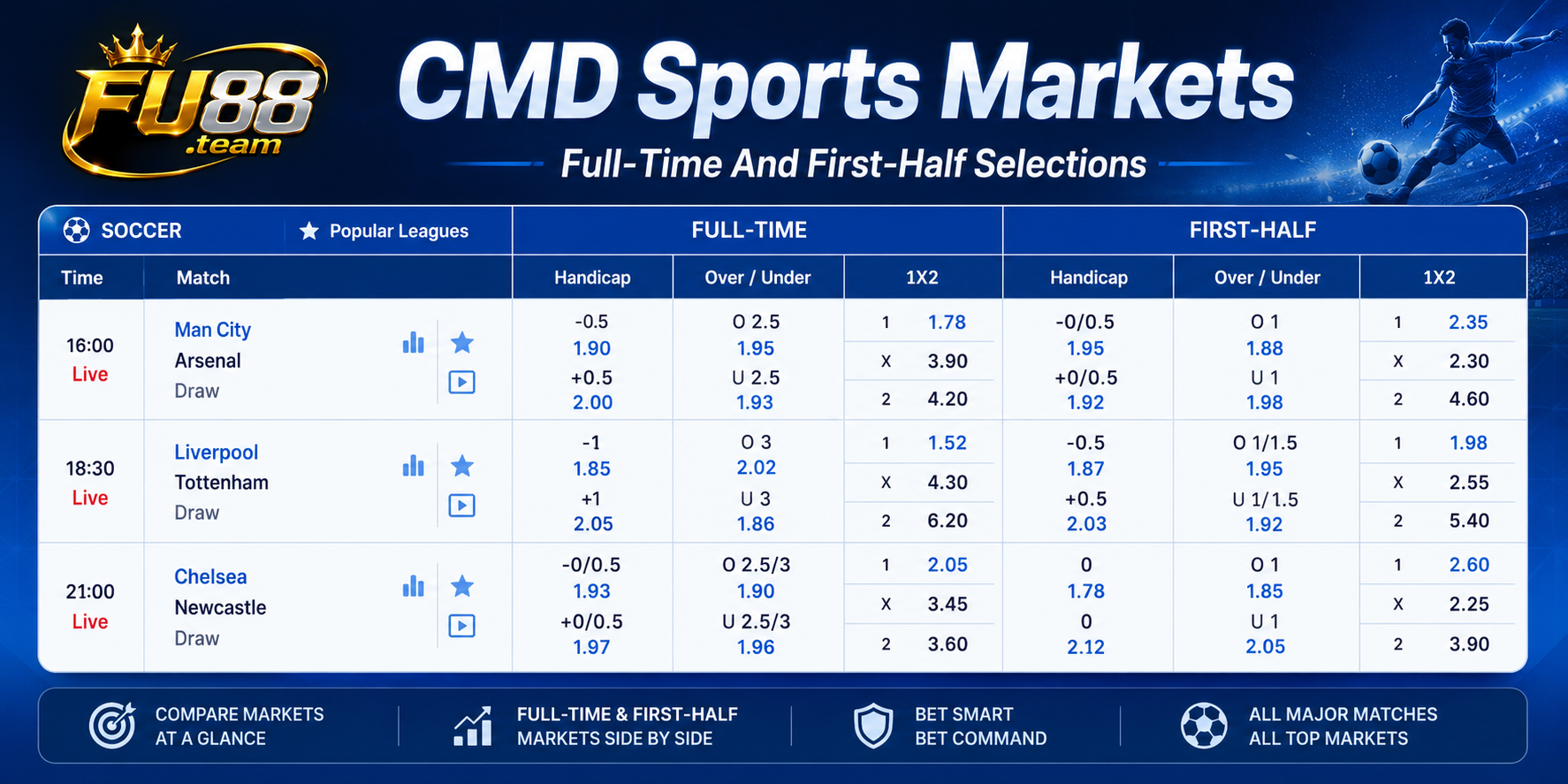
The central match table places several markets beside each fixture. Full-time and first-half selections are separated by headings, but they may appear close together on the same row.
The visible football columns include:
- Full-time Handicap
- Full-time Over/Under
- Full-time 1X2
- First-half Handicap
- First-half Over/Under
- First-half 1X2
A useful reading order is:
- Competition
- Teams
- Current score and time
- Full time or first half
- Market type
- Market line
- Displayed price
The market line and price are different values. For example, -0.5 may be an Asian Handicap condition, while the decimal number next to it is the accepted price if the ticket is confirmed.
Main Football Markets in CMD Sports
Asian Handicap
The Handicap market applies a virtual advantage or disadvantage to one side before the final result is evaluated.
Lines may appear as whole numbers, half goals or split values such as 0/0.5 and 0.5/1. Split lines may produce half-win or half-loss settlements.
The Asian Handicap betting guide explains how level-ball, quarter-goal and half-goal lines are settled.
Over and Under
The Over/Under market is based on whether the final number of goals or another stated statistic finishes above or below the selected total.
A line of 2.5 cannot result in an exact tie because the number of goals cannot finish at 2.5. A whole line such as 2.0 may return the stake when the relevant total finishes exactly on two, subject to the market rules.
1X2
The 1X2 market provides three possible outcomes:
- 1 for the designated home-team win
- X for the draw
- 2 for the designated away-team win
No virtual goal advantage is applied. The settlement period should still be checked because CMD Sports displays both full-time and first-half 1X2 markets.
Full-Time and First-Half Selections
A full-time ticket and a first-half ticket may contain the same teams and similar prices, but they do not use the same result.
The first-half market is settled using the score when the opening half ends. Goals scored after the interval do not change that result.
A standard full-time football market normally uses the score after 90 minutes plus added time unless the market title states otherwise.
Extra time and penalty shootouts should not be assumed to count automatically. The market name and sports rules should remain the main references.
Using the Live Center
The Live Center provides a focused area for events already in progress. It may display live scores, event status and available in-play selections.
Live prices can pause or change after:
- A goal
- A red card
- A penalty
- A period ending
- A technical interruption
- Another important match event
A changing price does not predict the final result. Check the current score, match time, market period and accepted ticket before treating the selection as recorded.
Parlay Markets in CMD Sports
The Parlay tab narrows the interface to selections that may be combined into one ticket.
A parlay normally requires all active selections to settle successfully for the complete ticket to win, unless one selection is voided according to the applicable rules.
Before confirming a combined ticket, review every leg separately:
- Event
- Market
- Match period
- Line
- Price
Two selections appearing in the same interface are not automatically compatible. The ticket panel will show whether the selected combination is accepted.
CMD Sports Esports Section
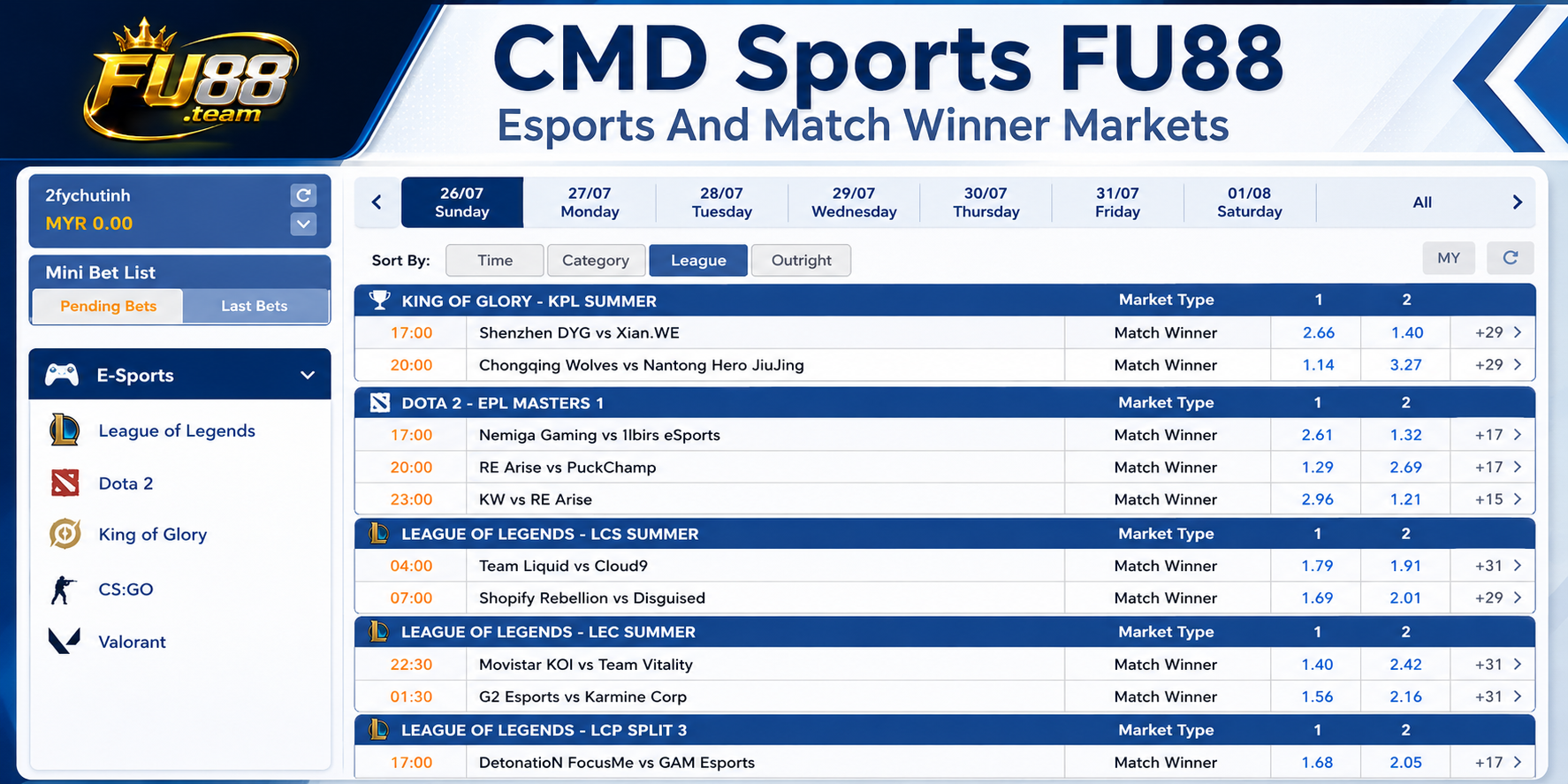
The reviewed CMD Sports lobby includes a separate esports page. Games visible in the interface include:
- King of Glory
- Dota 2
- League of Legends
The main visible esports market is Match Winner. Depending on the event, the market may refer to the complete match, series or another stated period.
Esports events do not always follow the same structure as football. Users should check:
- The game title
- The tournament
- The teams
- The match format
- The map or series period
- The selected market
A Match Winner selection should not be confused with Map Winner or another game-specific market.
Mini Bet List, Pending Bets and Last Bets
CMD Sports includes several areas for reviewing ticket information.
Mini Bet List
Mini Bet List provides a compact view of selected or recorded ticket information without leaving the main sports screen.
Pending Bets
Pending Bets contains accepted tickets that have not yet reached final settlement. A live or unfinished event may remain here until its result is confirmed.
Last Bets
Last Bets provides access to recent ticket activity. This can help confirm which event, market, line and price were recorded.
After confirming any selection, check:
- The correct event
- The selected team or result
- The market type
- The match period
- The accepted line
- The recorded odds
- The intended stake
The sports betting odds guide explains how to separate a market line from its displayed price.
What Makes the CMD Sports Layout Different?
CMD Sports combines a broad sports list, a Live Center, conventional football markets and esports within one interface.
Compared with BTi Sports, which centres on a wide European View, CMD provides more visible ticket panels through Mini Bet List, Pending Bets and Last Bets.
Compared with FB Sports, which places strong emphasis on video and esports navigation, CMD uses a more traditional market table while keeping esports as a separate event category.
Its main strength as an interface is the ability to move between scheduled events, live markets and recent ticket information without opening several unrelated pages.
Common Mistakes in CMD Sports
- Selecting a first-half market instead of full time
- Confusing the Handicap line with the displayed odds
- Choosing the wrong competition from a long event list
- Ignoring the current score in the Live Center
- Assuming every market can be added to a parlay
- Confusing Match Winner with Map Winner in esports
- Assuming extra time is included automatically
- Reading the screen without checking the accepted ticket
Frequently Asked Questions
Does CMD Sports FU88 Include Live Football?
Yes. The reviewed interface contains a Live Center and displays in-progress events with current match information.
Which Football Markets Are Visible?
The interface shows full-time and first-half Handicap, Over/Under and 1X2 markets.
Does CMD Sports Include Esports?
Yes. The supplied interface shows King of Glory, Dota 2 and League of Legends events.
What Is Mini Bet List Used For?
Mini Bet List provides a compact view of ticket information while the main sports lobby remains open.
What Is the Difference Between Pending Bets and Last Bets?
Pending Bets contains accepted tickets awaiting final settlement, while Last Bets provides access to recent ticket activity.
Conclusion
CMD Sports FU88 combines scheduled events, live markets, football selections, esports and ticket-tracking tools within a single sports dashboard.
Before confirming a selection, check the competition, event, current status, market period, line, odds and stake. Mini Bet List, Pending Bets and Last Bets should then be used to verify the details recorded on the ticket.
